PentesterLab Android Walkthrough: Labs 01–08
For this walkthrough series I will be using JADX & Frida (for the last challenge). Each of these PentesterLab Android exercises asks for a PIN-gated “key” hidden somewhere in the APK — the point of the series is progressively harder ways that key can be hidden (and broken).
Android 01
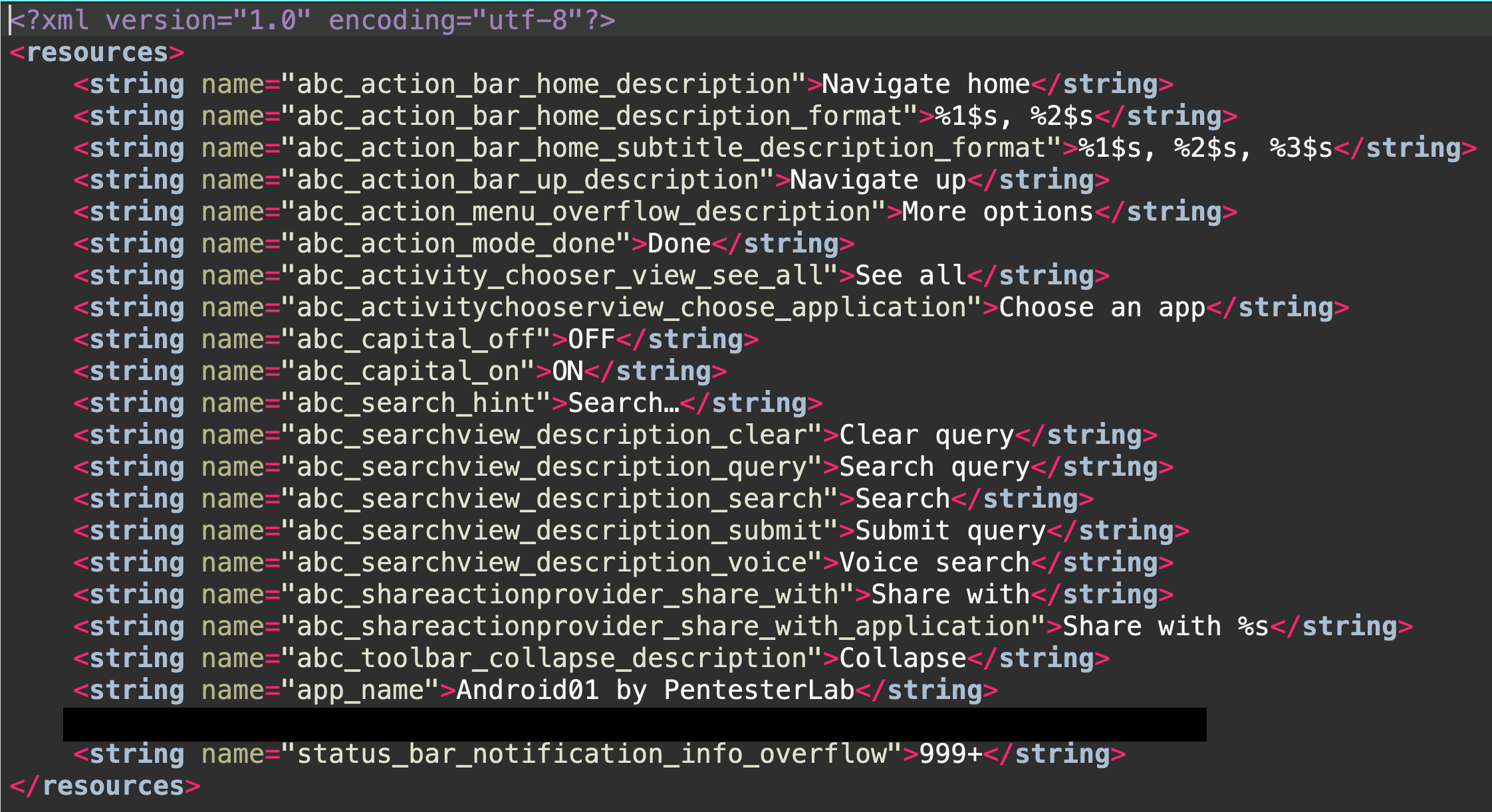
This application requires a PIN code to provide you with the key. The way to solve this exercise is to extract the content of the APK (using apktool for example) to get the configuration files of the application — namely AndroidManifest.xml and res/values/strings.xml.
In MainActivity, there is an Intent being initialized (MessageActivity) with the extra “pin”.
public void onClick(View view) {
        if (view.getId() != R.id.submit) {
            return;
        }
        if (Pin.count(Pin.class, "pin=?", new String[]{this.pin.getText().toString()}) > 0) {
            Intent intent = new Intent(getApplicationContext(), (Class<?>) MessageActivity.class);
            intent.putExtra("pin", this.pin.getText().toString());
            startActivity(intent);
            finish();
            return;
        }
        Toast.makeText(getBaseContext(), "Error: The pin you provided is invalid " + Pin.count(Pin.class), 1).show();
    }
In MessageActivity, there is a line with the function showMessage() that gets the string assigned to the variable ptlab_key from resources. There is where you will find the flag.
showMessage("The key is: \n" + getString(R.string.ptlab_key));
Android 02
Same PIN-gated premise, but this time the key isn’t in strings.xml — you need to check for shipped .db/.sqlite files. In MainActivity there is a reference to an asset called data.sqlite; this file contains the flag string.
    protected void onCreate(Bundle bundle) {
        try {
            InputStream open = getApplicationContext().getAssets().open("data.sqlite");
            FileOutputStream fileOutputStream = new FileOutputStream(getApplicationContext().getApplicationInfo().dataDir + "/databases/data.sqlite");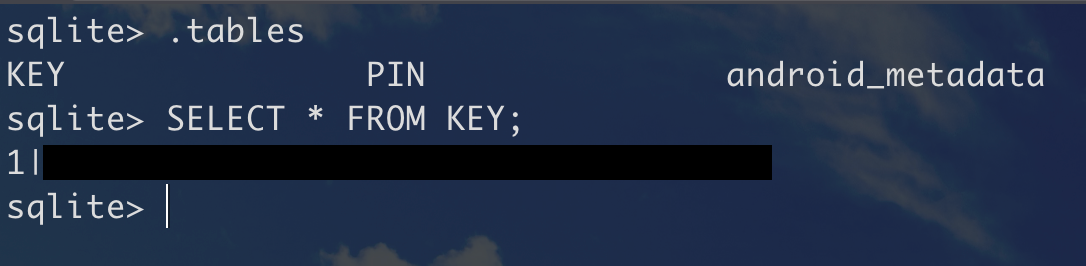
Android 03
For this one, the code is minimized to Smali (via apktool) or decompiled to Java (via dex2jar + jd-gui). Either way, the key is printed in plain-text right in the onCreate of MessageActivity.
protected void onCreate(@Nullable Bundle bundle) {
        super.onCreate(bundle);
        setContentView(R.layout.message);
        this.message = (TextView) findViewById(R.id.message);
        getIntent().getExtras().getString("pin");
        showMessage("The key is: \nREDACTED");
    }
Android 04
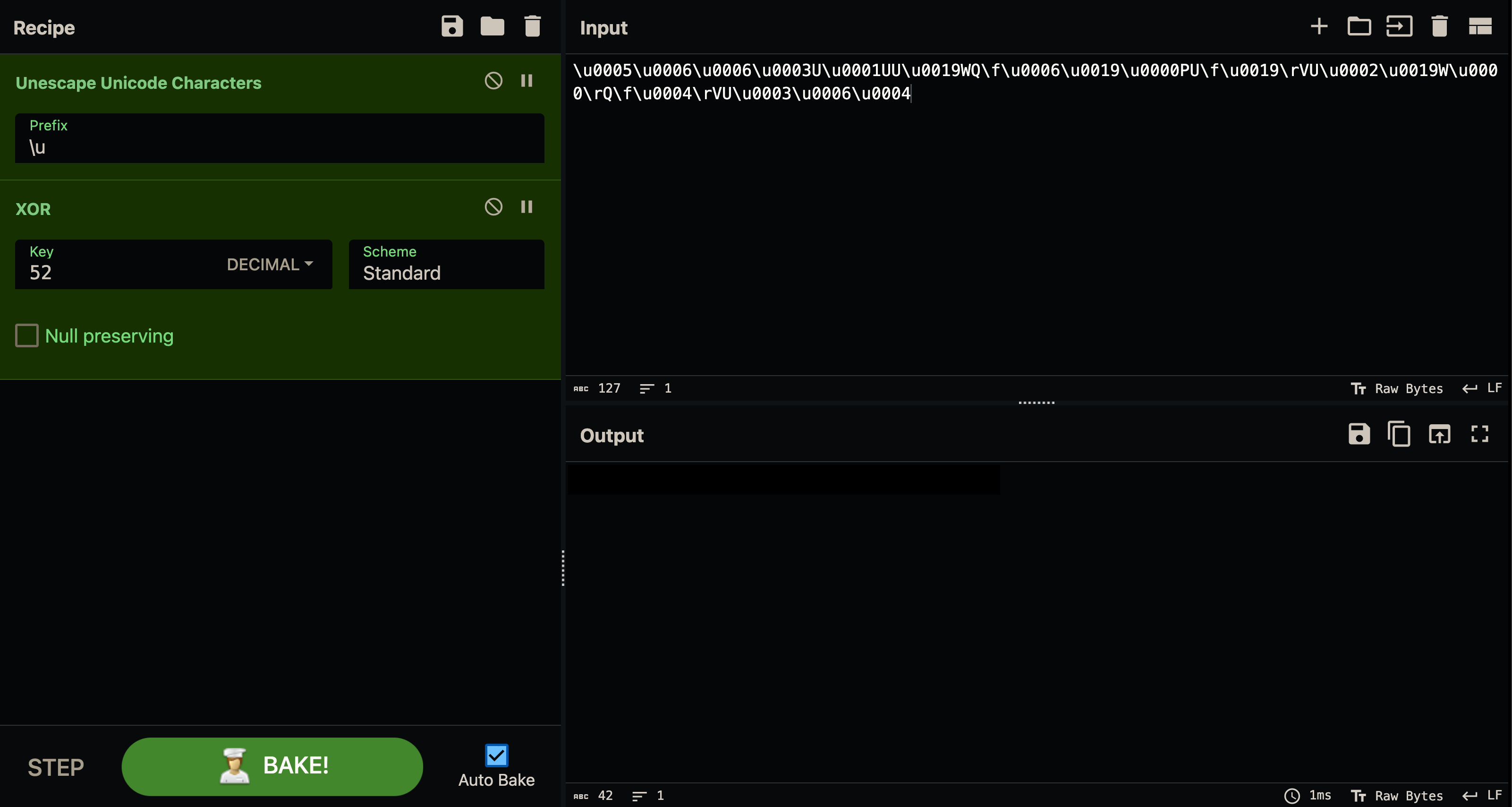
The key has been “encrypted” this time — it’s actually a XOR between the key and a single byte. There is a line that calls the class and method SecureStorage.decrypt, given a Unicode-escaped string with an XOR key of 52 bytes (0x34).
showMessage("The key is: \n" + SecureStorage.decrypt("UUUWQ\f�PU\f\rVUW�\rQ\f\rVU", (byte) 52));public static String decrypt(String str, byte b) {
byte[] bytes = str.getBytes();
byte[] bArr = new byte[bytes.length];
for (int i = 0; i < bytes.length; i++) {
bArr[i] = (byte) (bytes[i] ^ b);
}
return new String(bArr);
}If you take the Unicode-escaped string and unescape the characters then XOR it with the key, you will get the flag.
Android 05
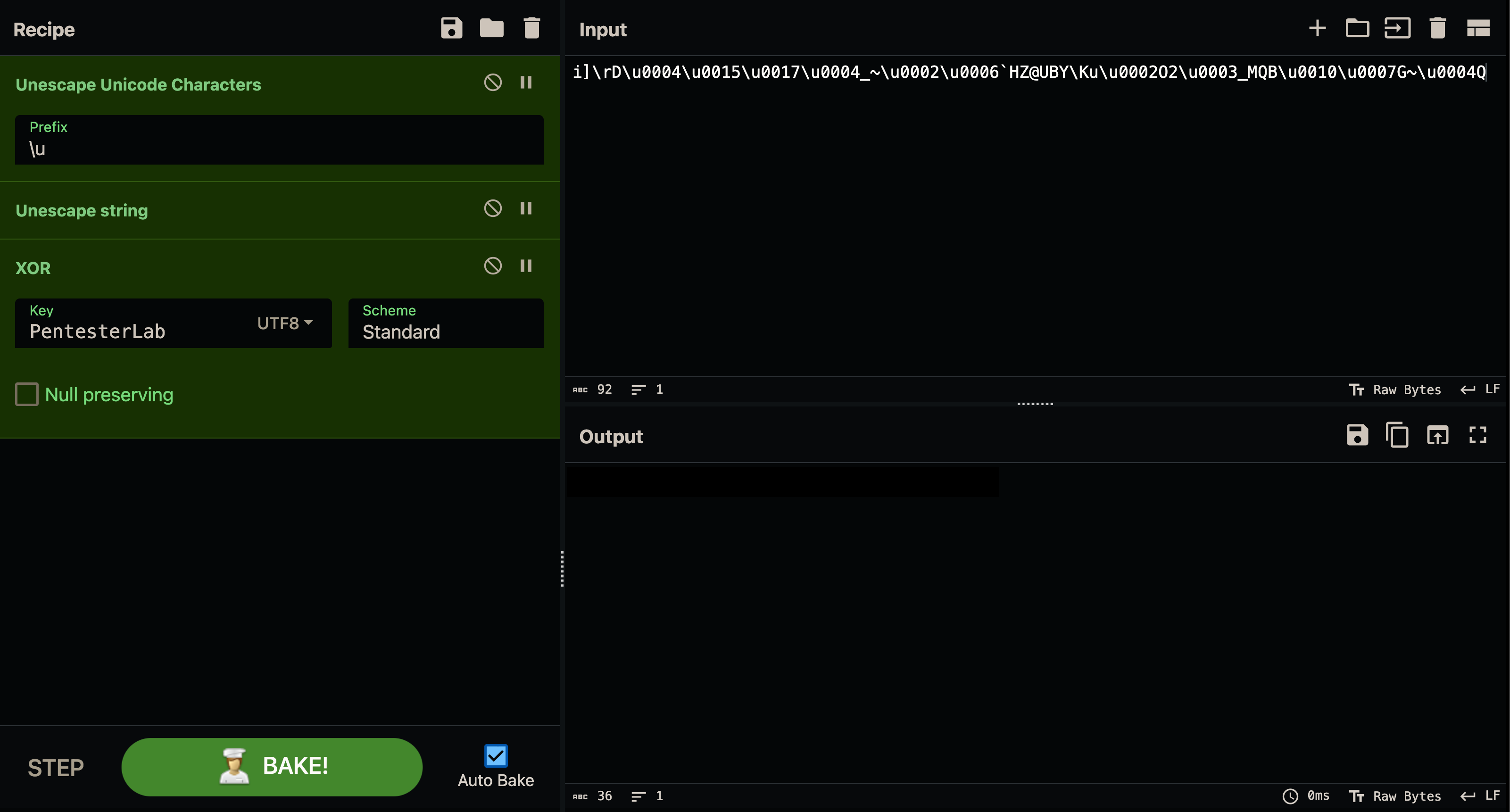
This time the code has been minimized using ProGuard, which makes reversing more complex. In the onCreate of MessageActivity there is another Unicode-escaped string, but this time containing escape characters such as \r (carriage return) and \\ (single backslash). This string is XOR’d against the key assigned to the variable decryption_key, located in Resources → Strings.
    protected void onCreate(Bundle bundle) {
        super.onCreate(bundle);
        setContentView(R.layout.message);
        this.l = (TextView) findViewById(R.id.message);
        getIntent().getExtras().getString("pin");
        a("The key is: \n" + a.a("i]\rD_~`HZ@UBY\\KuO2_MQBG~Q", getString(R.string.decryption_key)));
    }
Android 06
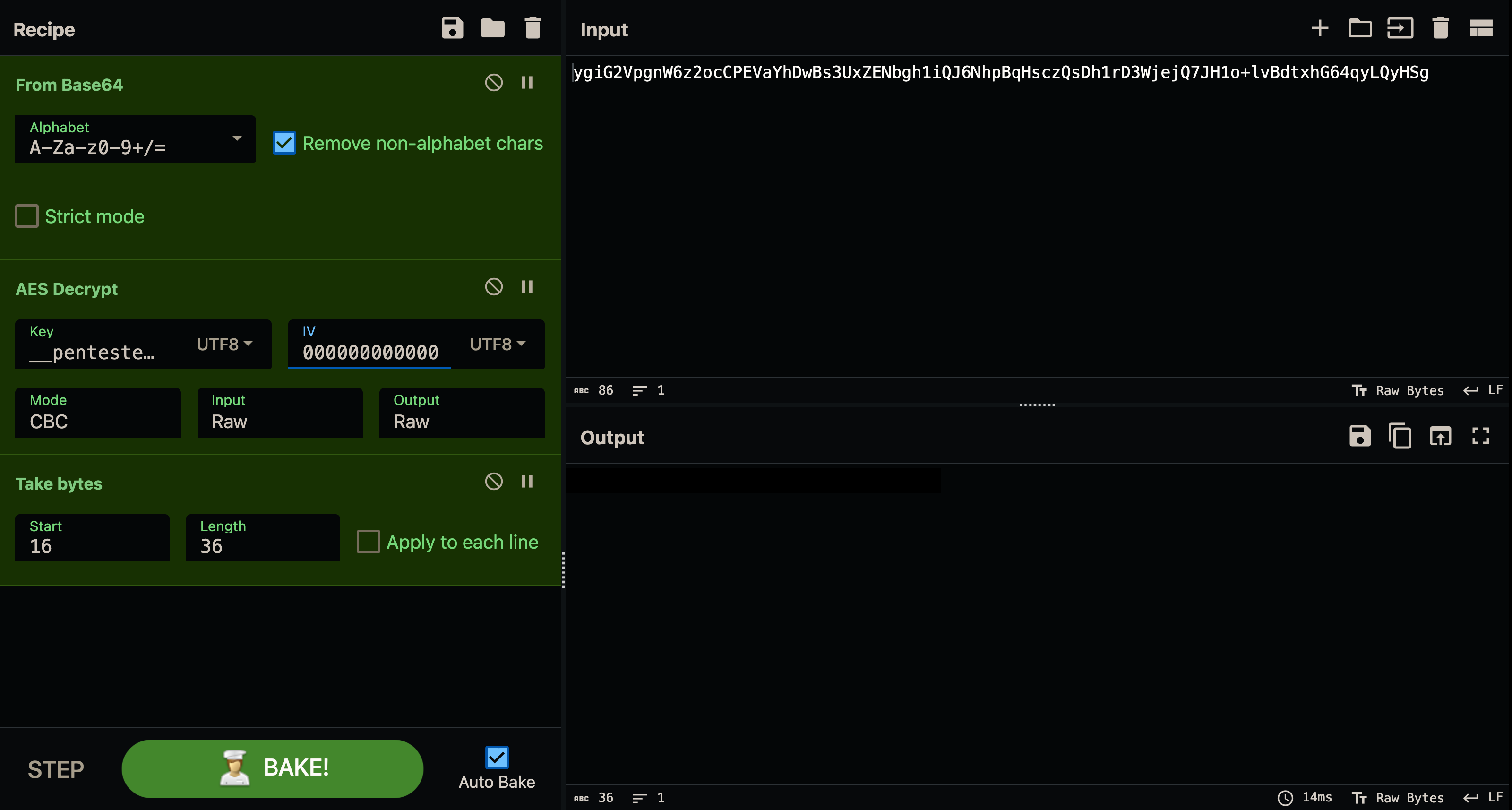
Also ProGuard-minimized, but this time proper AES-CBC encryption is used. There’s a Base64-encoded string and a hardcoded key __pentesterlab__.
a("The key is: \n" + a.a("ygiG2VpgnW6z2ocCPEVaYhDwBs3UxZENbgh1iQJ6NhpBqHsczQsDh1rD3WjejQ7JH1o+lvBdtxhG64qyLQyHSg", "__pentesterlab__".getBytes()));The decryption method:
public class a {
    public static String a(String str, byte[] bArr) {
        try {
            byte[] decode = Base64.decode(str, 0);
            byte[] bArr2 = new byte[decode.length];
            byte[] bArr3 = new byte[16];
            System.arraycopy(decode, 0, bArr3, 0, bArr3.length);
            IvParameterSpec ivParameterSpec = new IvParameterSpec(bArr3);
            int length = decode.length - 16;
            byte[] bArr4 = new byte[length];
            System.arraycopy(decode, 16, bArr4, 0, length);
            SecretKeySpec secretKeySpec = new SecretKeySpec(bArr, "AES");
            Cipher cipher = Cipher.getInstance("AES/CBC/PKCS5Padding");
            cipher.init(2, secretKeySpec, ivParameterSpec);
            return new String(cipher.doFinal(bArr4));
        } catch (Exception unused) {
            return "";
        }
    }
}
Broken down:
- Takes a Base64 string containing
[IV + encrypted data]. - Uses the password
"__pentesterlab__"as the AES key. - Extracts the IV from the first 16 bytes.
- Decrypts the remaining bytes using AES in CBC mode.
- Returns the plaintext string.
Android 07
Same AES-CBC scheme as Android 06, except now the key isn’t hardcoded — it’s MD5(PIN), where the PIN is a 4-digit string. Since the app calls this decryption with the user-entered PIN, and there are only 10,000 possible 4-digit PINs, this is trivial to brute-force by calling the app’s own decryption method repeatedly.
a("The key is: \n" + a.a("ED1nf3uLW4Hkwr1aGw+NpN5sgcRMPCFuk0XgtW181m4o6d0Ml3D/j6h1NSyOh4dbcGsbK6rcZOUyzHxWVb4QkA",
    getIntent().getExtras().getString("pin")));
The key is derived like this:
MessageDigest messageDigest = MessageDigest.getInstance("MD5");
messageDigest.update(str2.getBytes("UTF-8"));

byte[] bArr4 = new byte[16];
System.arraycopy(messageDigest.digest(), 0, bArr4, 0, bArr4.length);
SecretKeySpec secretKeySpec = new SecretKeySpec(bArr4, "AES");
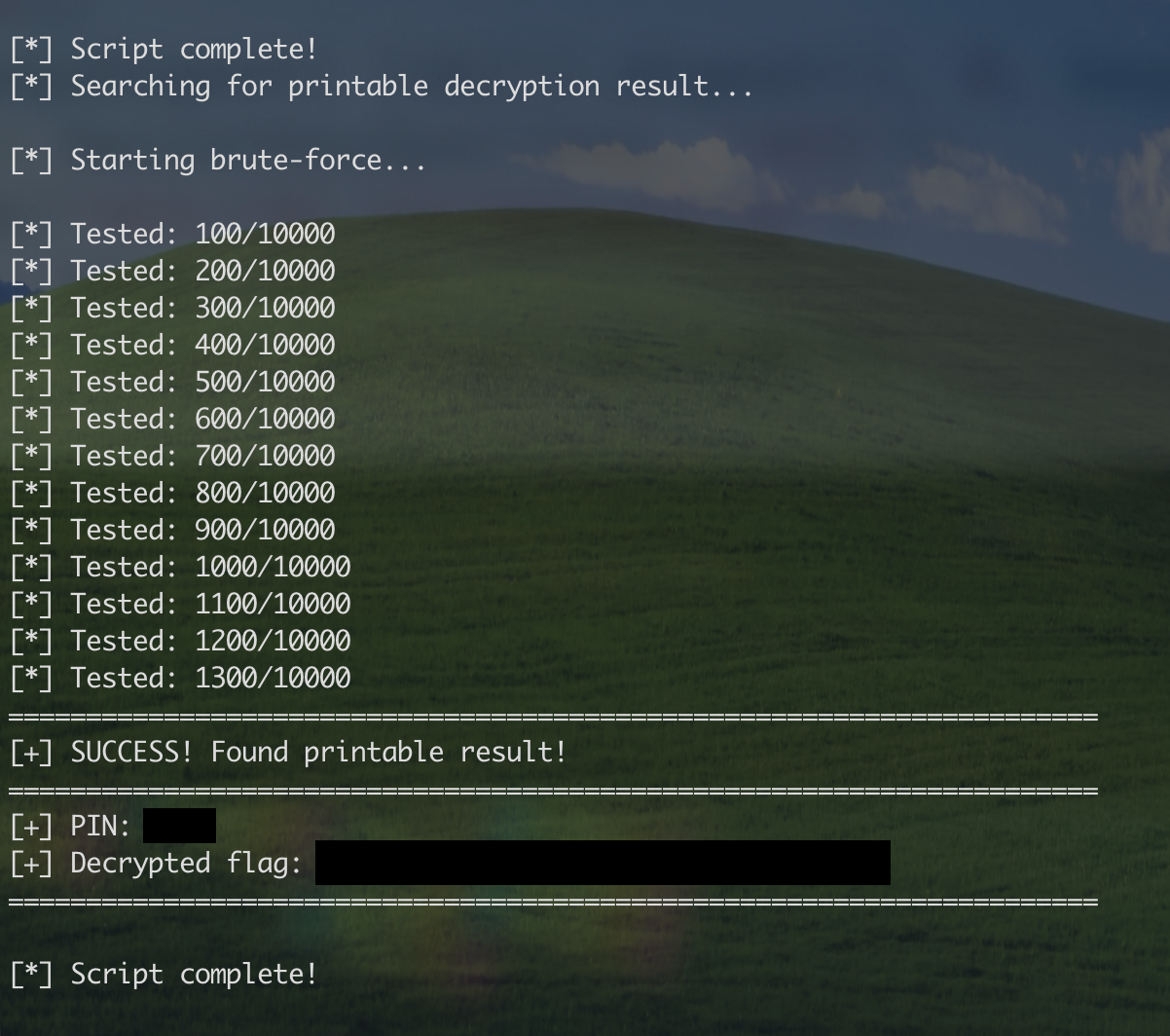
Instead of reimplementing the entire encryption scheme, Frida lets us call the app’s own decryption method thousands of times until we find the correct PIN:
Java.perform(function() {
    console.log("[*] Finding printable flag...\n");

    var DecryptClass = Java.use("com.pentesterlab.android07.a");
    var encryptedData = "ED1nf3uLW4Hkwr1aGw+NpN5sgcRMPCFuk0XgtW181m4o6d0Ml3D/j6h1NSyOh4dbcGsbK6rcZOUyzHxWVb4QkA";

    function isPrintable(str) {
        if (!str || str.length === 0) return false;
        var printable = 0;
        for (var i = 0; i < str.length; i++) {
            var c = str.charCodeAt(i);
            if ((c >= 32 && c <= 126) || c === 9 || c === 10 || c === 13) printable++;
        }
        return (printable / str.length) > 0.8;
    }

    for (var i = 0; i <= 9999; i++) {
        try {
            var pin = ("0000" + i).slice(-4);
            var result = DecryptClass.a(encryptedData, pin);

            if (result && result.length > 0 && isPrintable(result)) {
                console.log("[+] PIN: " + pin);
                console.log("[+] FLAG: " + result);
                break;
            }
        } catch (e) {}

        if (i % 500 === 0) console.log("[*] Tested: " + i);
    }
});
We target class a (obfuscated by ProGuard) and store the encrypted flag extracted from the app’s code, then iterate through every possible 4-digit PIN, calling the app’s decrypt method directly, and stop as soon as the output looks like readable text (at least 80% printable ASCII).
Android07 demonstrates a fundamental weakness in mobile app security: deriving encryption keys from weak user input. A 4-digit PIN has only 10,000 possible combinations, and even with proper AES encryption, MD5 hashing, and CBC mode, it can be cracked in seconds with dynamic instrumentation. The lesson: never use short PINs as the sole basis for encryption keys — use proper key derivation functions (like PBKDF2 or Argon2) with high iteration counts, or hardware-backed keystores that prevent direct access to cryptographic operations.
Android 08
The hardest of the series: the AES key now depends on two inputs — the PIN and a key fetched from a remote server:
MessageDigest messageDigest = MessageDigest.getInstance("MD5");
messageDigest.update(str3.getBytes("UTF-8"));  // Remote key
messageDigest.update(str2.getBytes("UTF-8"));  // PIN
So the final AES key is MD5(remoteKey + PIN). Before decryption can happen, the app fetches the remote key over HTTP:
HttpResponse execute = new DefaultHttpClient().execute(
    new HttpGet("https://pentesterlab.com/android08/keys.json")
);
The catch: the server validates your PIN and returns 403 for an invalid one, so a naive network-based brute-force would mean thousands of HTTP requests. Instead, once you’ve captured the remote key value from a legitimate response, Frida lets you call the decryption method directly and skip the network entirely:
'use strict';

Java.perform(function () {
  const PKG = 'com.pentesterlab.android08';
  const CLASS = PKG + '.a';
  const CT_B64 = 'G38zckAufW4B9A6sywz28kzgW8CCx1UWugLUTjKlo/kwV1CVesmr0tPX/JZOW0aik0TlkrcAIZZ/G0BigUtmeg==';
  const REMOTE_KEY = '<=== P3nt3st3rL4b ===>';
  const MIN_LEN = 4;
  const MAX_LEN = 6;

  function isPrintable(s) {
    if (!s) return false;
    if (s.length < 4) return false;
    for (let i = 0; i < s.length; i++) {
      const c = s.charCodeAt(i);
      const isPrintableAscii = (c >= 32 && c <= 126) || c === 9 || c === 10 || c === 13;
      if (!isPrintableAscii) return false;
    }
    const lower = s.toLowerCase();
    return /[a-z]/.test(lower) || lower.includes('key') || lower.includes('flag') || lower.includes('the ');
  }

  function* pinGenerator(minLen, maxLen) {
    for (let len = minLen; len <= maxLen; len++) {
      const max = Math.pow(10, len);
      for (let n = 0; n < max; n++) {
        yield n.toString().padStart(len, '0');
      }
    }
  }

  try {
    const Cls = Java.use(CLASS);
    const decryptStatic = Cls.a.overload('java.lang.String', 'java.lang.String', 'java.lang.String');

    console.log('[*] Starting PIN brute-force using app decryptor...');

    let found = false;
    for (const pin of pinGenerator(MIN_LEN, MAX_LEN)) {
      let result = null;
      try {
        result = decryptStatic.call(Cls, CT_B64, pin, REMOTE_KEY);
      } catch (e) {
        result = '';
      }

      if (result && isPrintable(result)) {
        console.log('[+] Found plausible PIN:', pin);
        console.log('[+] Plaintext:', result);
        found = true;
        break;
      }
    }

    if (!found) {
      console.log('[-] No valid PIN found in configured range.');
    }
  } catch (err) {
    console.error('[-] Failed to initialize brute-force:', err);
  }
});
The PIN generator produces candidates on demand (memory-efficient, one PIN at a time), and the same “is this readable ASCII” heuristic from Android 07 filters out garbage decryption results.
Challenge 8 demonstrates that even when an app implements server-side validation, local brute-forcing is still possible if the decryption logic is accessible on the client. The network dependency becomes irrelevant once you extract the remote key — Frida lets you call the app’s methods directly, turning what should be a slow network-bound attack into a fast local operation.

Related

Hunting With L0WK3Y (Ongoing Series)
Bug bounty and CTF write-ups, tools, cheat sheets and curated resources from L0WK3Y — served on a retro desktop. Opens the standalone Hunting With L0WK3Y site.

Exploiting the Ultimate Essay Grader: A Prompt Injection Deep Dive
A hands-on look at a direct prompt injection vulnerability in an AI essay grader — how a hidden instruction block forced a perfect score, mapped against Pangea's prompt injection taxonomy.
8kSec FactsDroid Walkthrough
Intercepting and modifying network traffic in a Flutter Android app — bypassing root detection and TLS, setting up DNAT for a proper MITM, and a detour into Flutter's HTTP network policy.